8.1 Database Concepts
AS Level · 3 questions found
What this topic covers
Section titled “What this topic covers”- Limitations of file-based approach; how relational databases address them
- Terminology: entity, table, record, field, tuple, attribute, primary/candidate/secondary/foreign key
- Relationships: one-to-many, one-to-one, many-to-many; referential integrity; indexing
- Entity-Relationship (E-R) diagrams for database design
- Normalisation: 1NF, 2NF, 3NF — explain, evaluate and produce a normalised design
Past paper questions
Section titled “Past paper questions” Q6

6
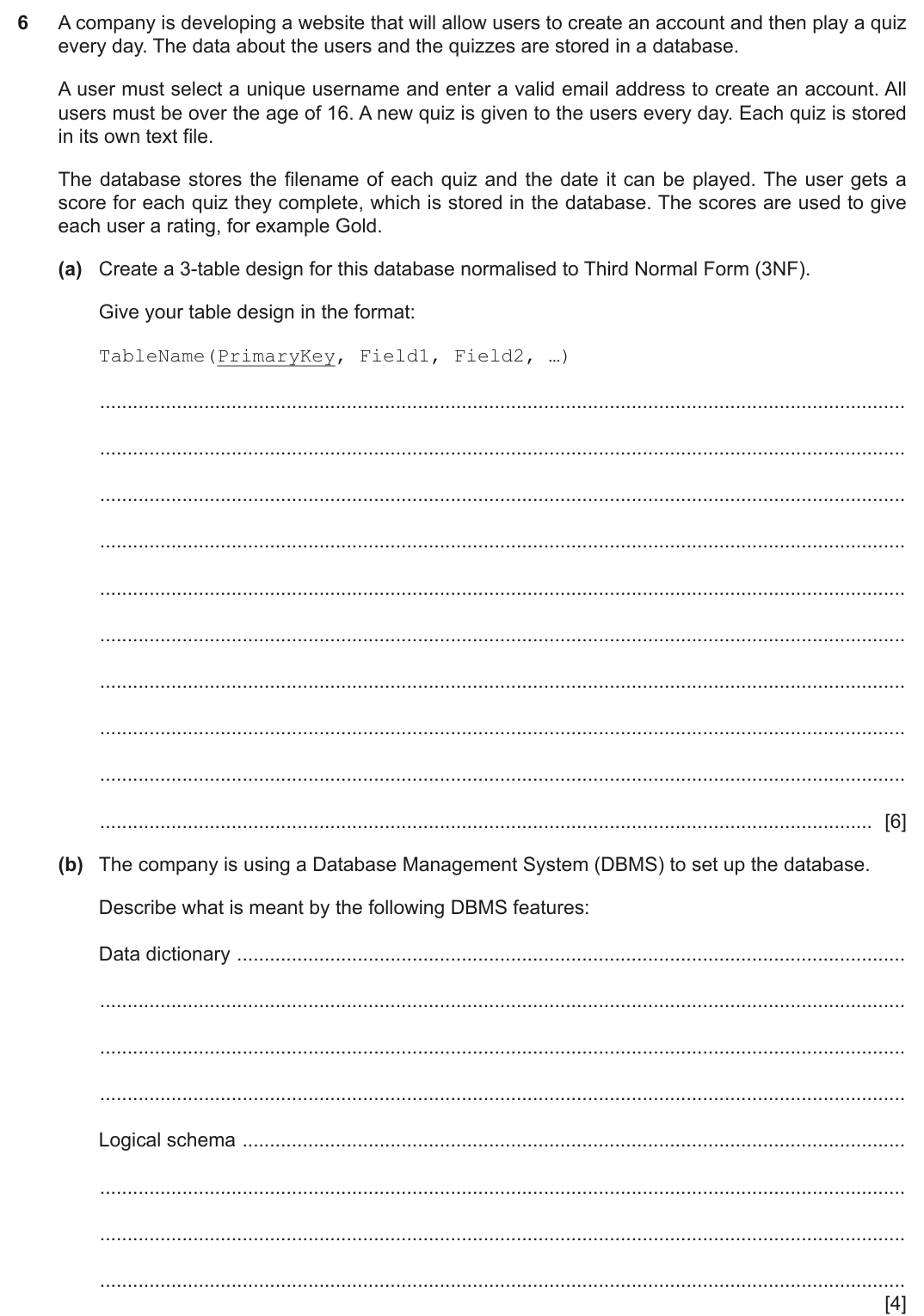
A company is developing a website that will allow users to create an account and then play a quiz
every day. The data about the users and the quizzes are stored in a database.
A user must select a unique username and enter a valid email address to create an account. All
users must be over the age of 16. A new quiz is given to the users every day. Each quiz is stored
in its own text file.
The database stores the filename of each quiz and the date it can be played. The user gets a
score for each quiz they complete, which is stored in the database. The scores are used to give
each user a rating, for example Gold.
(a) Create a 3-table design for this database normalised to Third Normal Form (3NF).
Give your table design in the format:
TableName(PrimaryKey, Field1, Field2, …)
............................................................................................................................................. [6]
(b) The company is using a Database Management System (DBMS) to set up the database.
Describe what is meant by the following DBMS features:
Data dictionary ..........................................................................................................................
Logical schema .........................................................................................................................
[4]
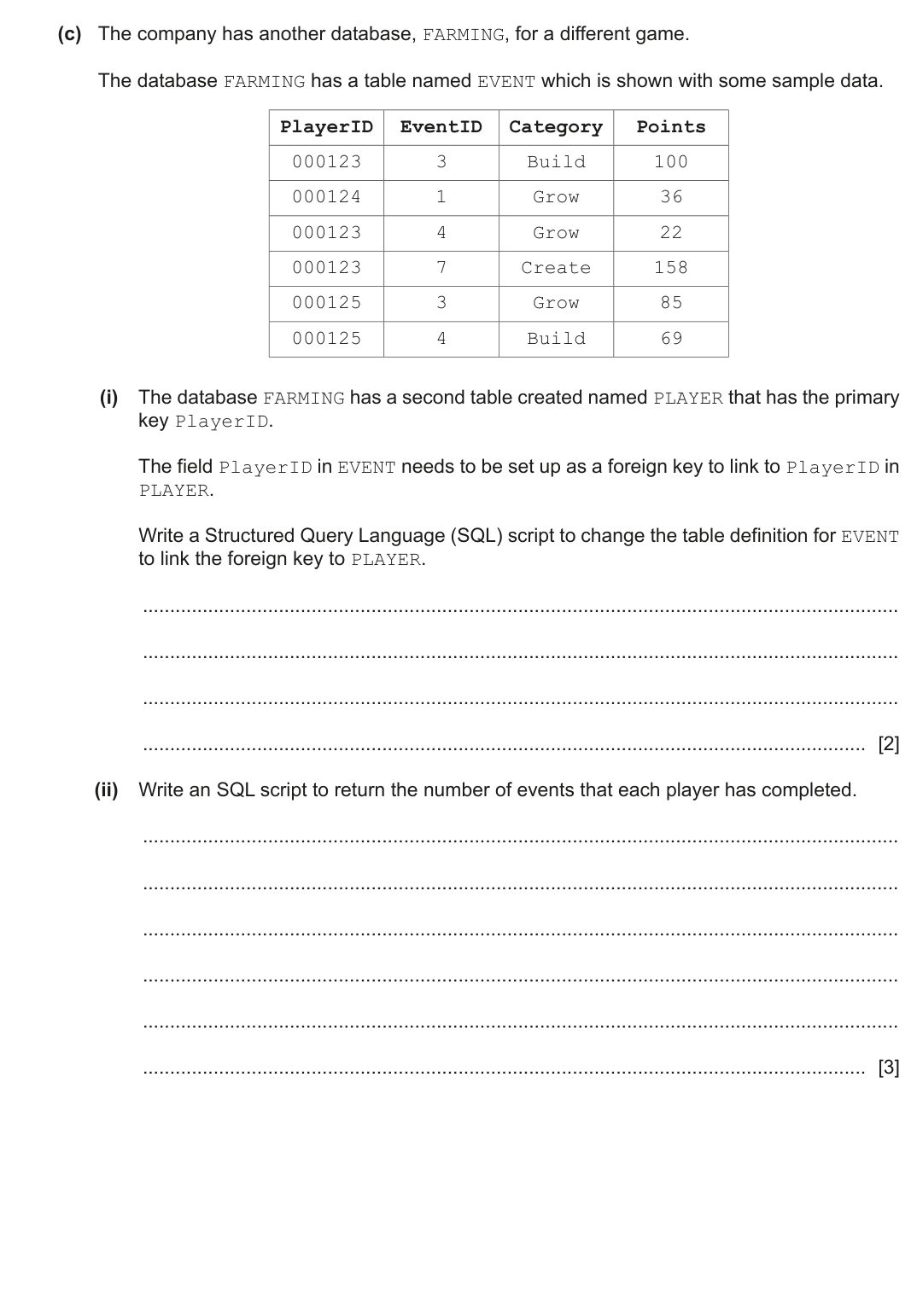
(c) The company has another database, FARMING, for a different game.
The database FARMING has a table named EVENT which is shown with some sample data.
PlayerID
EventID
Category
Points
000123
3
Build
100
000124
1
Grow
36
000123
4
Grow
22
000123
7
Create
158
000125
3
Grow
85
000125
4
Build
69
(i) The database FARMING has a second table created named PLAYER that has the primary
key PlayerID.
The field PlayerID in EVENT needs to be set up as a foreign key to link to PlayerID in
PLAYER.
Write a Structured Query Language (SQL) script to change the table definition for EVENT
to link the foreign key to PLAYER.
..................................................................................................................................... [2]
(ii) Write an SQL script to return the number of events that each player has completed.
..................................................................................................................................... [3]
Show mark scheme
6(a) [4 marks]
1 mark
each:
User table with the username as the Primary Key
… containing at least email address, date of birth / age and rating
Quiz table with Quiz ID or date or file name as the Primary Key.
… containing at least the other field(s) not used as the PK
A joining table with an appropriate name including at least fields for user
identification, quiz identification and score
… with an appropriate Primary Key
... and Foreign Keys matching the Primary Keys of the other two tables
USER(Username, Email, DateOfBirth, Rating)
QUIZ(QuizID, Date, Filename)
USER_QUIZ(Username, QuizID, Score)
each:
User table with the username as the Primary Key
… containing at least email address, date of birth / age and rating
Quiz table with Quiz ID or date or file name as the Primary Key.
… containing at least the other field(s) not used as the PK
A joining table with an appropriate name including at least fields for user
identification, quiz identification and score
… with an appropriate Primary Key
... and Foreign Keys matching the Primary Keys of the other two tables
USER(Username, Email, DateOfBirth, Rating)
QUIZ(QuizID, Date, Filename)
USER_QUIZ(Username, QuizID, Score)
6(b) [2 marks]
1 mark
each to
max 2
for data dictionary and
max 2
for logical schema:
Data dictionary:
Data about the data in the database // metadata
Identifies the characteristics of the data that will be stored
Appropriate example e.g. field names, table name, validation rules, data
types, primary / foreign keys, relationships etc.
Logical schema:
Conceptual design
Platform/database independent overview of the database
Is used to design the physical structure
Appropriate example e.g. Design of entities / E-R diagram / views
each to
max 2
for data dictionary and
max 2
for logical schema:
Data dictionary:
Data about the data in the database // metadata
Identifies the characteristics of the data that will be stored
Appropriate example e.g. field names, table name, validation rules, data
types, primary / foreign keys, relationships etc.
Logical schema:
Conceptual design
Platform/database independent overview of the database
Is used to design the physical structure
Appropriate example e.g. Design of entities / E-R diagram / views
6(c)(i)
1 mark
for each correct clause:
Alter table EVENT
Adding foreign key as PlayerID referencing correct table
ALTER TABLE EVENT
ADD FOREIGN KEY(PlayerID)REFERENCES PLAYER(PlayerID);
for each correct clause:
Alter table EVENT
Adding foreign key as PlayerID referencing correct table
ALTER TABLE EVENT
ADD FOREIGN KEY(PlayerID)REFERENCES PLAYER(PlayerID);
6(c)(ii) [3 marks]
1 mark
each:
Selecting PlayerID from EVENT
Counting EventID
Grouping by the PlayerID
Example:
SELECT PlayerID, COUNT(EventID)
FROM EVENT
GROUP BY PlayerID;
each:
Selecting PlayerID from EVENT
Counting EventID
Grouping by the PlayerID
Example:
SELECT PlayerID, COUNT(EventID)
FROM EVENT
GROUP BY PlayerID;
Q4


4
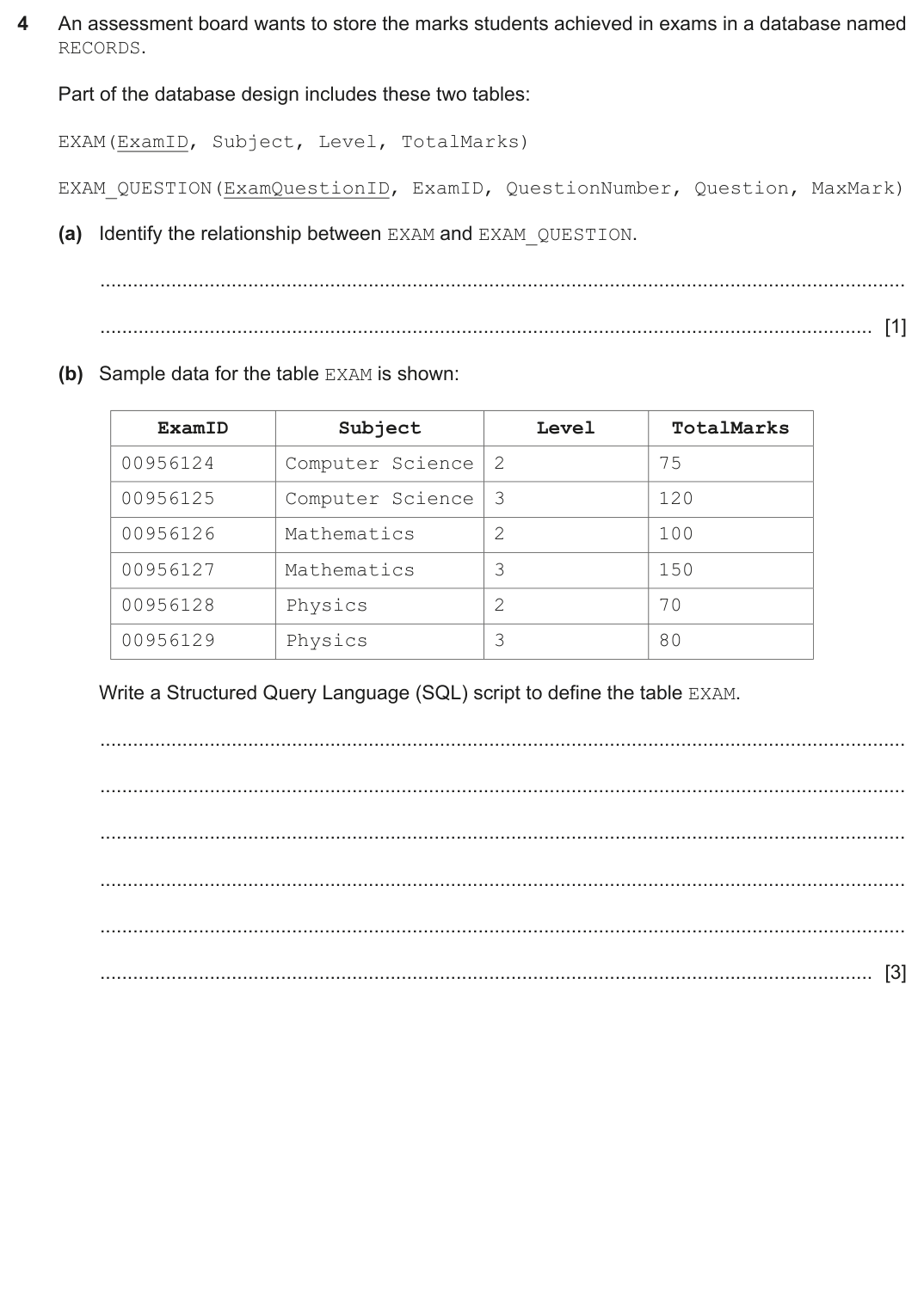
An assessment board wants to store the marks students achieved in exams in a database named
RECORDS.
Part of the database design includes these two tables:
EXAM(ExamID, Subject, Level, TotalMarks)
EXAM_QUESTION(ExamQuestionID, ExamID, QuestionNumber, Question, MaxMark)
(a) Identify the relationship between EXAM and EXAM_QUESTION.
............................................................................................................................................. [1]
(b) Sample data for the table EXAM is shown:
ExamID
Subject
Level
TotalMarks
00956124
Computer Science
2
75
00956125
Computer Science
3
120
00956126
Mathematics
2
100
00956127
Mathematics
3
150
00956128
Physics
2
70
00956129
Physics
3
80
Write a Structured Query Language (SQL) script to define the table EXAM.
............................................................................................................................................. [3]
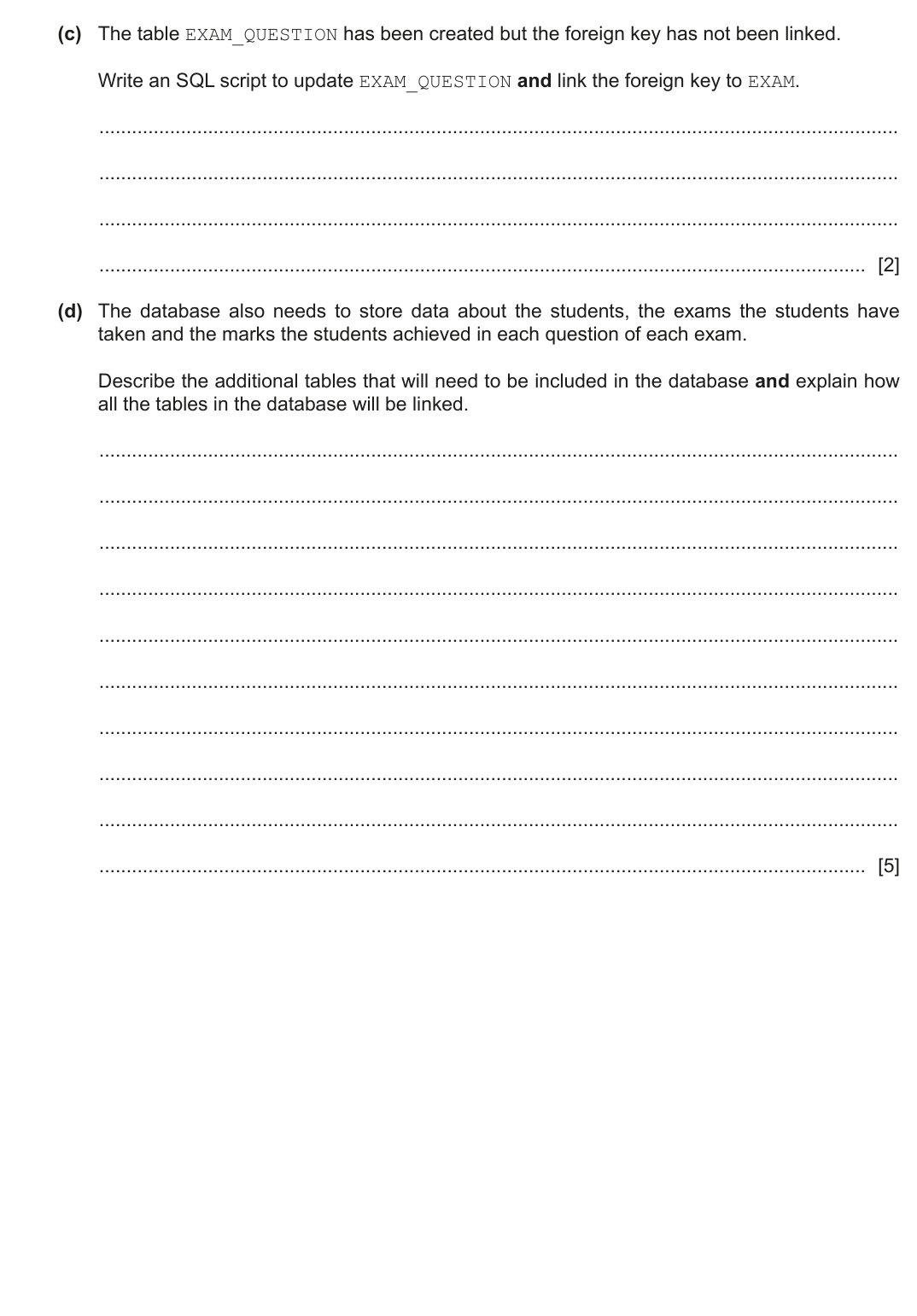
(c) The table EXAM_QUESTION has been created but the foreign key has not been linked.
Write an SQL script to update EXAM_QUESTION and link the foreign key to EXAM.
............................................................................................................................................. [2]
(d) The database also needs to store data about the students, the exams the students have
taken and the marks the students achieved in each question of each exam.
Describe the additional tables that will need to be included in the database and explain how
all the tables in the database will be linked.
............................................................................................................................................. [5]
BLANK PAGE
Show mark scheme
4(a) [3 marks]
1 mark
for:
1-to-many
for:
1-to-many
4(b)
1 mark
each:
Creating table EXAM with opening and closing brackets
All fields with appropriate data types and commas at end of lines
ExamID as primary key
Example:
CREATE TABLE EXAM(
ExamID varchar NOT NULL,
Subject varchar,
Level int,
TotalMarks int,
PRIMARY KEY(ExamID)
);
each:
Creating table EXAM with opening and closing brackets
All fields with appropriate data types and commas at end of lines
ExamID as primary key
Example:
CREATE TABLE EXAM(
ExamID varchar NOT NULL,
Subject varchar,
Level int,
TotalMarks int,
PRIMARY KEY(ExamID)
);
4(c) [2 marks]
1 mark
each:
Altering table EXAM_QUESTION
Linking ExamID to ExamID in EXAM
Example.
ALTER TABLE EXAM_QUESTION
ADD FOREIGN KEY (ExamID) REFERENCES EXAM(ExamID);
each:
Altering table EXAM_QUESTION
Linking ExamID to ExamID in EXAM
Example.
ALTER TABLE EXAM_QUESTION
ADD FOREIGN KEY (ExamID) REFERENCES EXAM(ExamID);
4(d) [5 marks]
1 mark
each to
max 5
:
STUDENT table identified with suitable Primary Key
A linking table between STUDENT and EXAM with suitable Primary Key
and
appropriate name
… that includes the Primary Key of the STUDENT table as a Foreign Key
to join with STUDENT
... and includes the Primary Key of the EXAM table as a Foreign Key to
join with EXAM
A linking table between STUDENT and EXAM_QUESTION with suitable
Primary Key
and
appropriate name
… that includes the Primary Key of Table 2 as a Foreign Key to join with
Table 2
… that stores the ExamQuestionID and the mark for that question
each to
max 5
:
STUDENT table identified with suitable Primary Key
A linking table between STUDENT and EXAM with suitable Primary Key
and
appropriate name
… that includes the Primary Key of the STUDENT table as a Foreign Key
to join with STUDENT
... and includes the Primary Key of the EXAM table as a Foreign Key to
join with EXAM
A linking table between STUDENT and EXAM_QUESTION with suitable
Primary Key
and
appropriate name
… that includes the Primary Key of Table 2 as a Foreign Key to join with
Table 2
… that stores the ExamQuestionID and the mark for that question
Q4

4
A theatre wants to use a database to store data about the shows that are scheduled, their
customers and the seats that the customers have booked.
In the theatre:
•
Each show can take place on multiple dates.
•
Some dates can have more than one performance.
•
There are multiple rows of seats.
•
Each seat can be individually booked by its row letter and seat number, for example row E
seat 2.
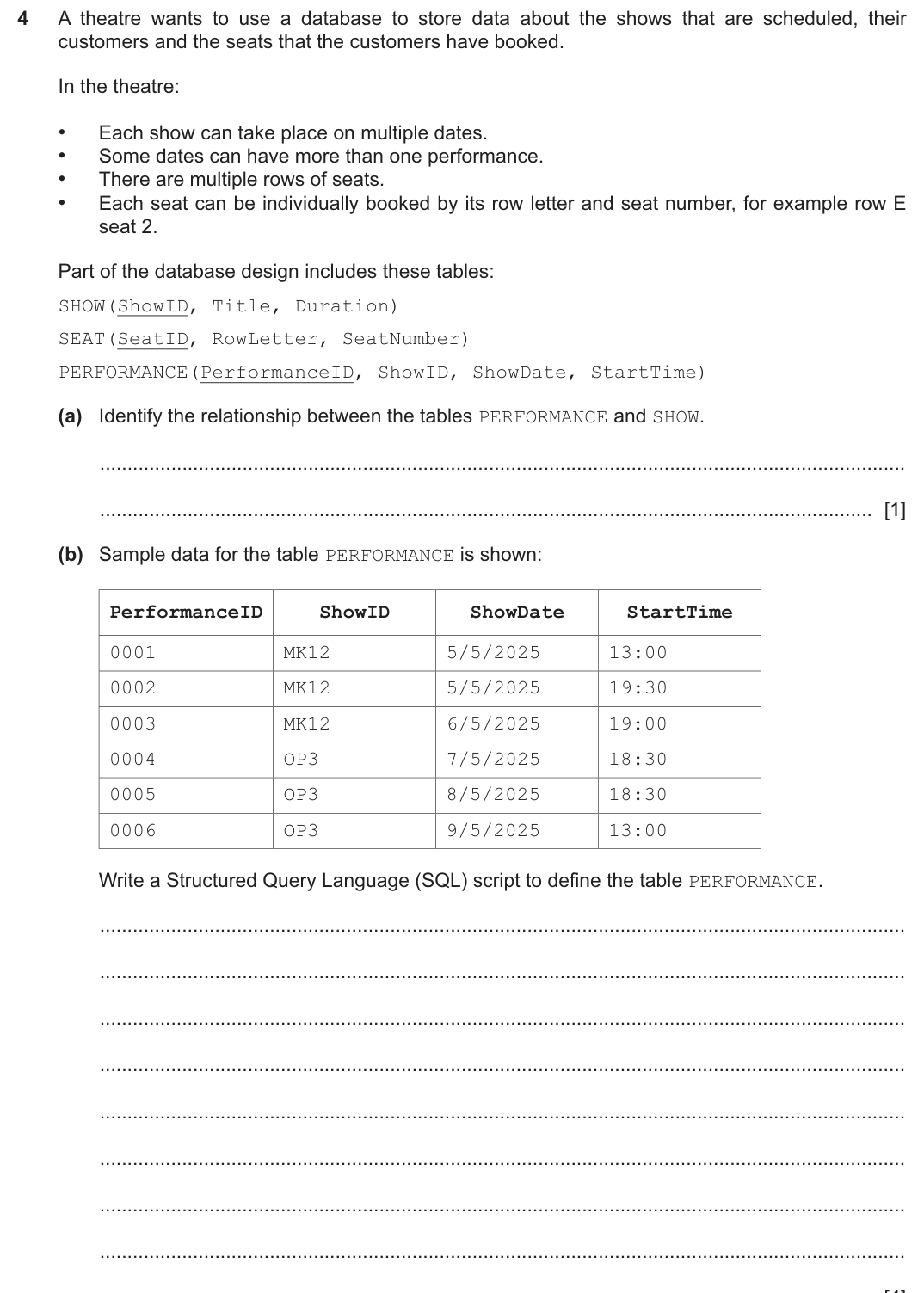
Part of the database design includes these tables:
SHOW(ShowID, Title, Duration)
SEAT(SeatID, RowLetter, SeatNumber)
PERFORMANCE(PerformanceID, ShowID, ShowDate, StartTime)
(a) Identify the relationship between the tables PERFORMANCE and SHOW.
............................................................................................................................................. [1]
(b) Sample data for the table PERFORMANCE is shown:
PerformanceID
ShowID
ShowDate
StartTime
0001
MK12
5/5/2025
13:00
0002
MK12
5/5/2025
19:30
0003
MK12
6/5/2025
19:00
0004
OP3
7/5/2025
18:30
0005
OP3
8/5/2025
18:30
0006
OP3
9/5/2025
13:00
Write a Structured Query Language (SQL) script to define the table PERFORMANCE.
............................................................................................................................................. [4]
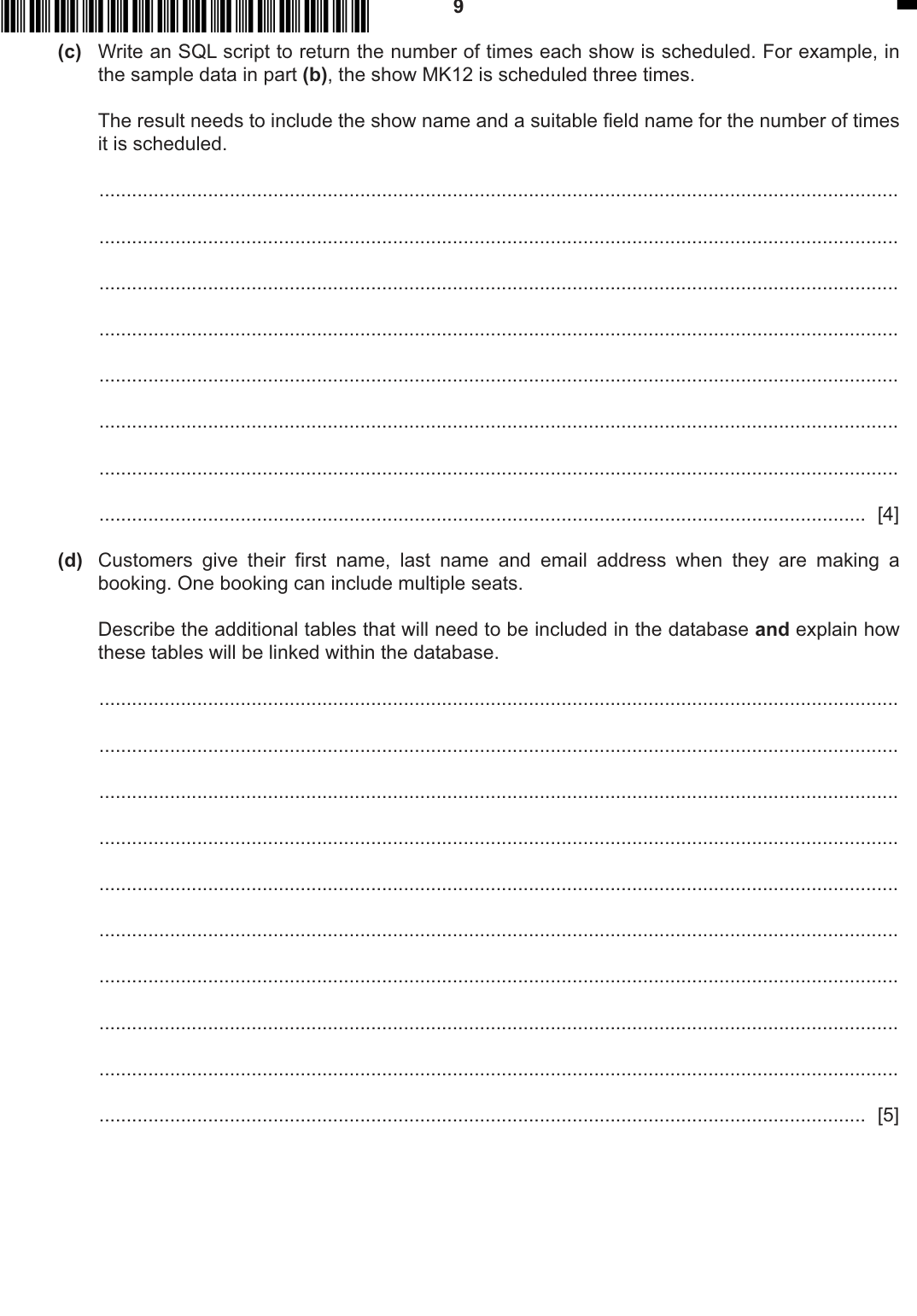
(c) Write an SQL script to return the number of times each show is scheduled. For example, in
the sample data in part (b), the show MK12 is scheduled three times.
The result needs to include the show name and a suitable field name for the number of times
it is scheduled.
............................................................................................................................................. [4]
(d) Customers give their first name, last name and email address when they are making a
booking. One booking can include multiple seats.
Describe the additional tables that will need to be included in the database and explain how
these tables will be linked within the database.
............................................................................................................................................. [5]
,
,
,
,
Show mark scheme
4(a) [4 marks]
1 mark
for:
many to 1 // there are many performances of each show
for:
many to 1 // there are many performances of each show
4(b) [4 marks]
1 mark
each for:
Creating table
with opening and closing brackets
PERFORMANCE
Setting all four attributes with appropriate data types
Setting
as primary key
PerformanceID
Setting
as foreign key referencing
table
ShowID
SHOW
Example:
CREATE TABLE PERFORMANCE(
PerformanceID varchar NOT NULL,
ShowID varchar,
ShowDate Date,
StartTime Time,
PRIMARY KEY(PerformanceID),
FOREIGN KEY(ShowID) REFERENCES SHOW(ShowID)
);
each for:
Creating table
with opening and closing brackets
PERFORMANCE
Setting all four attributes with appropriate data types
Setting
as primary key
PerformanceID
Setting
as foreign key referencing
table
ShowID
SHOW
Example:
CREATE TABLE PERFORMANCE(
PerformanceID varchar NOT NULL,
ShowID varchar,
ShowDate Date,
StartTime Time,
PRIMARY KEY(PerformanceID),
FOREIGN KEY(ShowID) REFERENCES SHOW(ShowID)
);
4(c)
1 mark
each for:
Selecting
of an attribute in
table with suitable name
COUNT
PERFORMANCE
clause
FROM
Joining tables
Grouping by the title and selecting the title
Example 1:
SELECT SHOW.Title, Count(PERFORMANCE.PerformanceID)
AS NumberOfShowings
FROM PERFORMANCE, SHOW
WHERE PERFORMANCE.ShowID = SHOW.ShowID
GROUP BY SHOW.Title;
Example 2:
SELECT SHOW.Title, Count(PERFORMANCE.PerformanceID)
AS NumberOfShowings
FROM PERFORMANCE INNER JOIN SHOW
ON PERFORMANCE.ShowID = SHOW.ShowID
GROUP BY SHOW.Title;
each for:
Selecting
of an attribute in
table with suitable name
COUNT
PERFORMANCE
clause
FROM
Joining tables
Grouping by the title and selecting the title
Example 1:
SELECT SHOW.Title, Count(PERFORMANCE.PerformanceID)
AS NumberOfShowings
FROM PERFORMANCE, SHOW
WHERE PERFORMANCE.ShowID = SHOW.ShowID
GROUP BY SHOW.Title;
Example 2:
SELECT SHOW.Title, Count(PERFORMANCE.PerformanceID)
AS NumberOfShowings
FROM PERFORMANCE INNER JOIN SHOW
ON PERFORMANCE.ShowID = SHOW.ShowID
GROUP BY SHOW.Title;
4(d) [5 marks]
1 mark
each to
max 5
:
e.g.
CUSTOMER table identified with suitable Primary Key and appropriate
name
… and other suitable fields including name and email
BOOKING TABLE identified with suitable Primary Key and appropriate
name
… that stores the Primary Key of the CUSTOMER table as a Foreign Key
to join with CUSTOMER table
… and stores the Primary Key of the PERFORMANCE table as a Foreign
Key to join with PERFORMANCE table
A linking table between Table 2 and SEAT with suitable Primary Key and
appropriate name
… that includes the Primary Key of Table 2 as a Foreign Key to join with
Table 2
… that stores the SeatID.
each to
max 5
:
e.g.
CUSTOMER table identified with suitable Primary Key and appropriate
name
… and other suitable fields including name and email
BOOKING TABLE identified with suitable Primary Key and appropriate
name
… that stores the Primary Key of the CUSTOMER table as a Foreign Key
to join with CUSTOMER table
… and stores the Primary Key of the PERFORMANCE table as a Foreign
Key to join with PERFORMANCE table
A linking table between Table 2 and SEAT with suitable Primary Key and
appropriate name
… that includes the Primary Key of Table 2 as a Foreign Key to join with
Table 2
… that stores the SeatID.